xml driven, interactive slideshow
So a client asked me to do an interactive slideshow to replace their flash one on their home page. So I'm pretty new to jquery but I have done the accordion and the tabs plugins so i was feeling pretty good. Until he said he wanted the slides content to be brought in through xml. Not one for turning down work I accepted. I'm now gonna show the final product and how I did it. This is really for newbies to jquery, an advanced guy may just laugh, but this project pushed me beyond changing css and animating divs.
View the working page: here
Get the source files here: source files
Anyway I went to Nettuts and found this great article. well it was enough to keep me busy for a couple hours. So this is my xml:

So there is my xml. I wanted a header, an image, text, and a link button.
*Sidenote for those who don't know anything about xml, its just text, it can't DO anything until jquery tells it to. I always knew that from doing a pod cast awhile ago but I really started to understand the power when I came across that tutorial. So thanks to the article by Jeffrey Way I now know how to bring in xml at least one way. So now Ill show how I brought the xml it into the page:
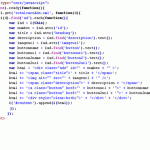
You can see that in line 11 I use the.get function then specify the url to the file, in this case the same folder, and then specify a function in this case ((d) random letter, it could be anything you want, then called that function on the next line hence the $(d)
Next i ".find" the tag "ad" in the xml, and say for ".each" time you find it do this.... then i list what to do.
I never understood variables, or var until this project. The tutorial I looked at didn't explain to me what it was doing. The vars are what I wanted to name that data and the stuff on the other side of the = is the data I needed to work with.
For example I wanted to use the heading attribute of ad in my xml file to be the heading in my html for each div..... so when i made that var title it says on the other side of = tag"ad", find the attribute "heading" then convert it to text. That may not mean much but look at line 23. where i say create a span with a ccs class "title" insert the data from the heading attribute or var"title" and then close the span tags. I could have made it a div or an h1 or anything.
So stick with that logic when looking at the source files.
At the end on line 29 I say what ever has the id "content" put the things I just created inside it.
That took me a couple hours to do. I won't lie, I'm smart but stupid when it comes to basically a foreign language. So my next and final goal was to make it rotate and have little boxes display what slide i was on and if you clicked on them they would take you to that slide.
Of course after hours of trying it myself I found a great plugin Cycle. Omg that thing solved my problems so fast it made my head spin. There is great documentation on that site for the plugin but i couldn't get it to work. After 2 hours I realized that it was the placement of my code. I was running it alongside of the xml thing , I chained it to the function on line 29 and it worked perfect.
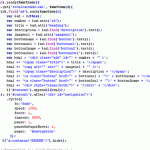
I put on line 40, if any 'a' had text in it called HIDDEN to ".hide" it, that way you could have 2 buttons per slide or just one.
This was an amazing experience that I'm glad i had. Hopefully if someone see's an easier way to do this let me know, but i tested it in IE6, IE7, FF2, FF3, and Chrome and it all worked gravy. Well it doesn't quite validate but I don't know why. I also wanna thank another jqueryhelp.com member Zack ( cant remember his on screen name) for his syntax guidance even though he actually has a real job and I sit at home and scrape pennies from my couch cushions.
View the working page: here
Get the source files here: source files
Anyway I went to Nettuts and found this great article. well it was enough to keep me busy for a couple hours. So this is my xml:
So there is my xml. I wanted a header, an image, text, and a link button.
*Sidenote for those who don't know anything about xml, its just text, it can't DO anything until jquery tells it to. I always knew that from doing a pod cast awhile ago but I really started to understand the power when I came across that tutorial. So thanks to the article by Jeffrey Way I now know how to bring in xml at least one way. So now Ill show how I brought the xml it into the page:
You can see that in line 11 I use the.get function then specify the url to the file, in this case the same folder, and then specify a function in this case ((d) random letter, it could be anything you want, then called that function on the next line hence the $(d)
Next i ".find" the tag "ad" in the xml, and say for ".each" time you find it do this.... then i list what to do.
I never understood variables, or var until this project. The tutorial I looked at didn't explain to me what it was doing. The vars are what I wanted to name that data and the stuff on the other side of the = is the data I needed to work with.
For example I wanted to use the heading attribute of ad in my xml file to be the heading in my html for each div..... so when i made that var title it says on the other side of = tag"ad", find the attribute "heading" then convert it to text. That may not mean much but look at line 23. where i say create a span with a ccs class "title" insert the data from the heading attribute or var"title" and then close the span tags. I could have made it a div or an h1 or anything.
So stick with that logic when looking at the source files.
At the end on line 29 I say what ever has the id "content" put the things I just created inside it.
That took me a couple hours to do. I won't lie, I'm smart but stupid when it comes to basically a foreign language. So my next and final goal was to make it rotate and have little boxes display what slide i was on and if you clicked on them they would take you to that slide.
Of course after hours of trying it myself I found a great plugin Cycle. Omg that thing solved my problems so fast it made my head spin. There is great documentation on that site for the plugin but i couldn't get it to work. After 2 hours I realized that it was the placement of my code. I was running it alongside of the xml thing , I chained it to the function on line 29 and it worked perfect.
I put on line 40, if any 'a' had text in it called HIDDEN to ".hide" it, that way you could have 2 buttons per slide or just one.
This was an amazing experience that I'm glad i had. Hopefully if someone see's an easier way to do this let me know, but i tested it in IE6, IE7, FF2, FF3, and Chrome and it all worked gravy. Well it doesn't quite validate but I don't know why. I also wanna thank another jqueryhelp.com member Zack ( cant remember his on screen name) for his syntax guidance even though he actually has a real job and I sit at home and scrape pennies from my couch cushions.
Topic Participants
adamelevate
theosqua
casualbliss